I was poking around Chrome experiments recently and found something called HTML in Canvas. The name sounded wrong enough that I had to look at it.
Canvas is normally where HTML stops. Once I am in WebGL or WebGPU, I expect textures, shaders and buffers. If I want a button, some text or an input inside that world, I either draw something that looks like one or put normal DOM over the canvas and spend some time making sure the two agree about where everything is.
HTML in Canvas adds a third option.
Chrome is experimenting with letting real DOM content become something Canvas, WebGL and WebGPU can draw. The HTML still exists as HTML. The browser still has its structure and semantics. WebGPU just gets an image of it that it can treat like any other texture.
Naturally, my first thought was to make a perfectly normal settings panel wobble.
The GPU sees pixels. Chrome still sees HTML.
The basic idea is surprisingly small.
You put HTML inside a canvas that opts into drawable content:
<canvas content="drawable">
  <article drawable>
    <h2>Very Serious Panel</h2>
    <p>The GPU is currently making this behave badly.</p>
  </article>
</canvas>
That <article> is still part of the DOM. Chrome lays it out, records a snapshot of how it looks, then lets WebGPU copy that snapshot into a texture using drawElementImageToTexture().
From WebGPU's point of view, there is nothing particularly HTML about it anymore. It is an image. I can distort it, rotate it, add lighting or make it ripple because apparently this is what frontend development was missing.
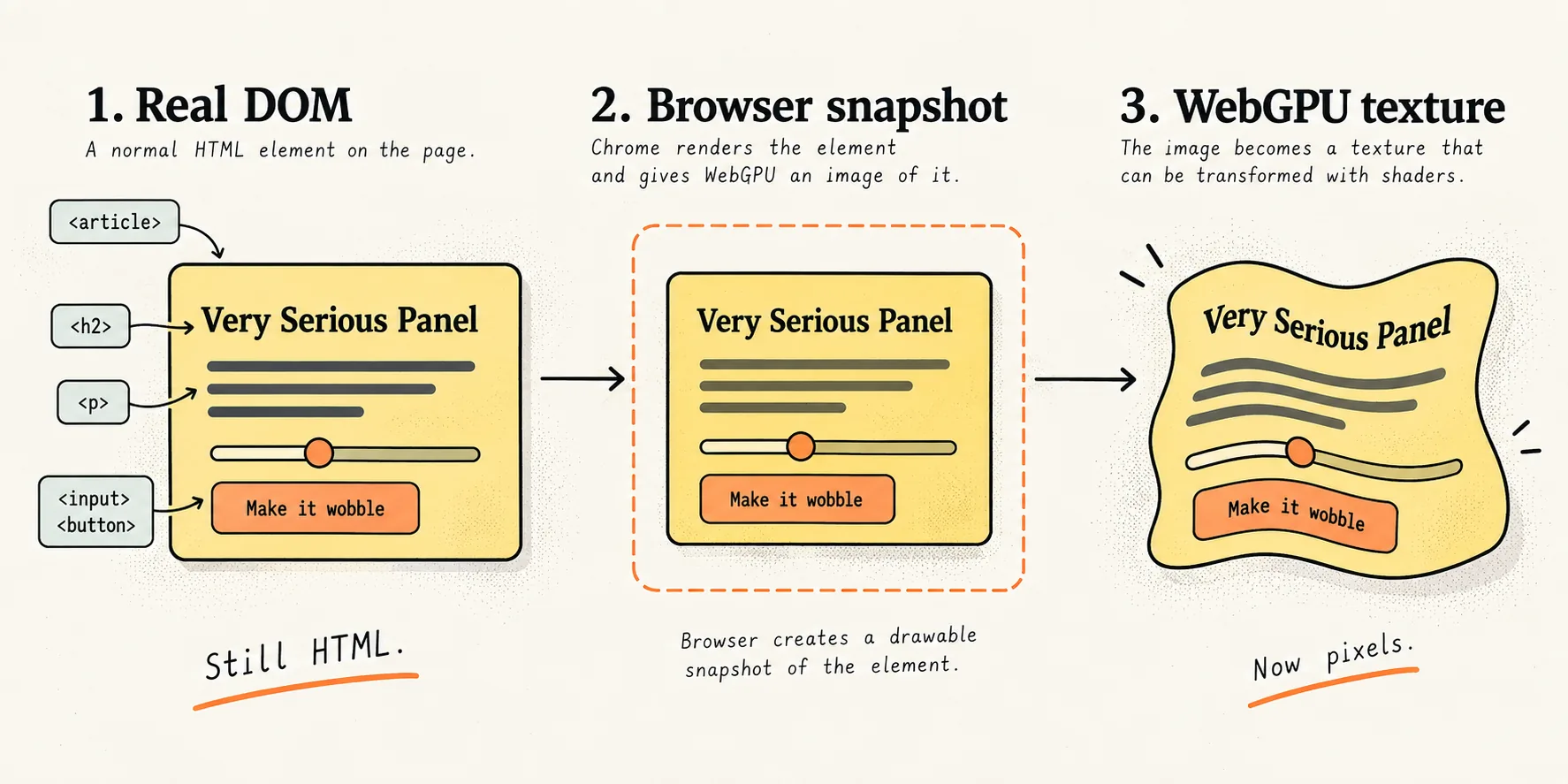
What I like about this is that we are not rebuilding the UI inside WebGPU.
The browser still owns the bits browsers are already good at. HTML structure, text layout, accessibility information and things like find in page remain tied to the DOM content. The proposal explicitly keeps drawable descendants in the accessibility tree rather than turning them into anonymous pixels.
The graphics renderer gets to mess with how those pixels look.
That is a much more interesting split than replacing the DOM entirely.
I built the stupid version
I made a tiny demo because this makes far more sense when you can actually see it.
It has an ordinary HTML card and a WebGPU shader. The card gets copied into a texture and the shader makes it wobble. Change the HTML and the texture gets a fresh version of it.
There is no React and no Three.js. Just HTML, JavaScript and WebGPU, mostly because I wanted the odd part of the API to stay visible.
Make HTML wobble in WebGPU
This is a deliberately small experiment with Chrome's HTML in Canvas API.
The yellow card starts life as normal DOM. Chrome turns it into a drawable snapshot, WebGPU copies that into a texture, and a shader distorts the result.
Change the DOM and WebGPU gets the new pixels. Change the wobble and the HTML itself does not change at all.
To run it today, use Chrome Canary and enable both flags:
chrome://flags/#canvas-draw-element
chrome://flags/#enable-experimental-web-platform-features
Then serve the repo over localhost and open it in Canary.
npx serve .The API is still experimental, so expect the exact names to move.
I think the useful part of the demo is not really the wobble. It is opening DevTools afterwards.
There is still an <article> sitting there.
WebGPU just happens to be showing another version of it.
Then geometry ruins the simple story
There is an awkward bit.
The browser knows where the original DOM element is. WebGPU knows where it rendered the texture. Those are not necessarily the same place.
If I take that card and rotate it thirty degrees, I can describe that transform back to the browser. The proposal has updateElementGeometry() for exactly this. That lets Chrome line the DOM geometry up with where the rendered version ended up, which matters for hit testing and accessibility.
With 2D canvas, Chrome can handle some of this automatically because it knows where you drew the element. With WebGL and WebGPU, you have to provide the geometry because the browser cannot inspect your entire rendering pipeline and work it out for you.
And then I make the card wobble.
A normal transform is easy enough to describe. A shader that moves every pixel differently is not.
There is no useful DOM matrix that says, "the button is mostly here, except the left edge is currently going in one direction and the bottom corner has other plans."
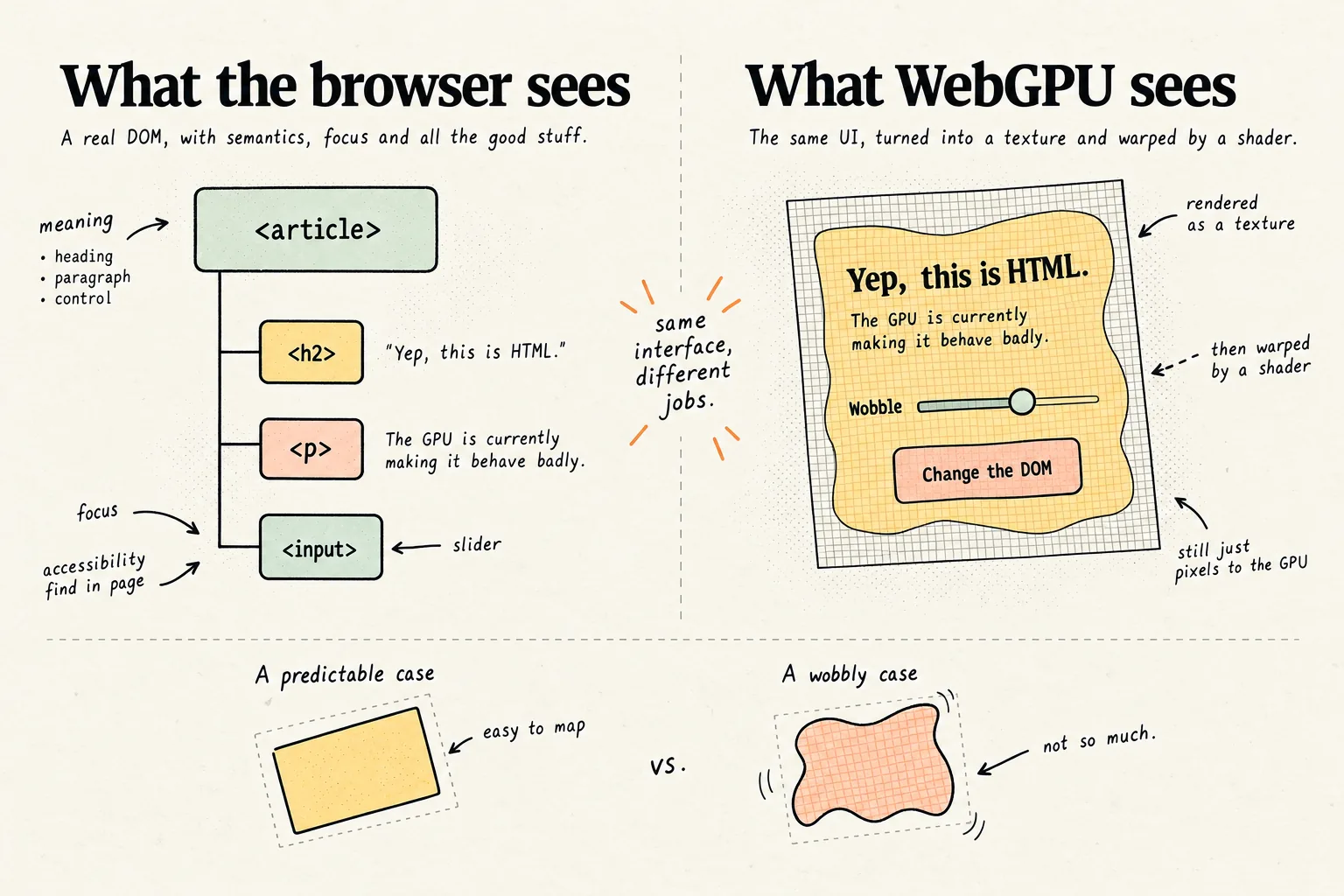
That limitation is important because otherwise this starts sounding more magical than it is.
WebGPU does not suddenly understand HTML. The DOM does not know what your shader did. The API gives both sides a way to cooperate, but you still have to keep them in agreement when interaction matters.
This solves a surprisingly old problem
Canvas apps eventually need boring UI.
Games need menus. Diagram tools need labels. Design software needs inputs. Data visualisations need text. Three dimensional product interfaces eventually need something more useful than another glowing cube.
You can build all of that inside your renderer, but then you also own text layout, keyboard input, focus, localisation and accessibility.
Or you can put DOM over the canvas, which works quite well until the DOM needs to actually belong inside the graphical scene.
HTML in Canvas sits somewhere between those two approaches.
Keep the UI as HTML.
Let the graphics system decide what it looks like.
I do not think every settings page now needs a fragment shader. Mine certainly does not.
But for apps that already sit somewhere between a document and a graphics engine, this creates a strange new boundary that I want to play with.
DevTools sees an <article>.
WebGPU sees a texture.
Both are looking at the same interface.
That feels wrong.
Which is probably why I find it interesting.